Mechanical keyboards have come a long way from their one-size-fits-all origins. What once required careful research and a permanent commitment to a single switch type has transformed into a playground of endless customization. At the heart of this revolution lies hot-swappable technology—a feature that lets you pull out and replace switches without ever picking up a soldering iron. For tech enthusiasts who crave personalization, this innovation solves a persistent problem: the complexity of choosing the perfect keyboard when your preferences might change over time. Whether you’re a gamer seeking the ideal actuation force, a programmer wanting quieter keys, or simply someone who loves tinkering with hardware, hot-swappable mechanical keyboards offer flexibility that traditional boards simply cannot match. This article explores why hot-swappable keyboards deserve your attention, covering their core benefits, how they enhance gaming performance, connectivity considerations, and what you can expect across different price ranges. By the end, you’ll have a clear roadmap for selecting the right hot-swappable keyboard for your needs.
What Are Hot-Swappable Switches and Why They Matter?
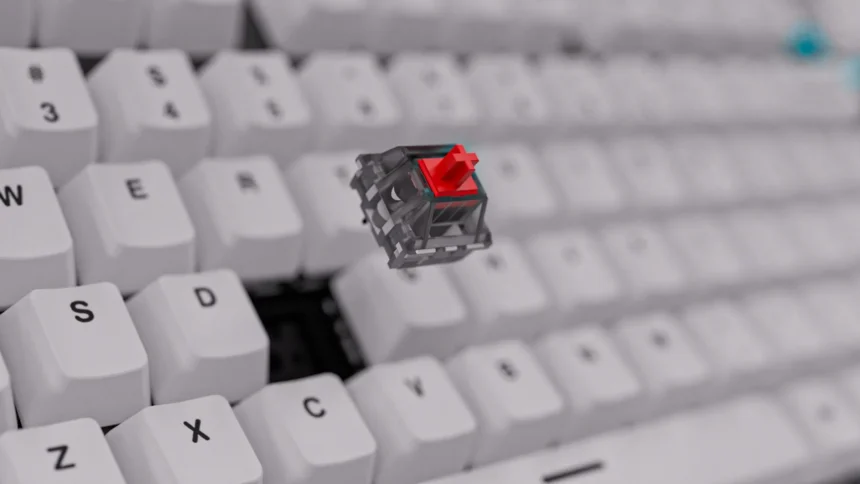
Hot-swappable switches are mechanical key switches that can be removed and inserted into a keyboard without soldering. Unlike traditional mechanical keyboards where each switch is permanently soldered to the PCB (printed circuit board), hot-swappable boards use specialized sockets that grip switch pins through friction or spring-loaded contacts. You simply pull a switch out with a basic extraction tool and press a new one into place—the entire process takes seconds per key.
The technology relies on receptacle sockets mounted directly on the PCB. These sockets accept switch pins and create an electrical connection instantly, eliminating the need for any technical skill or equipment. This design fundamentally changes the ownership experience in three ways. First, customization becomes effortless—you can mix linear, tactile, and clicky switches across a single board to match different keys to different tasks. Second, repair is trivial; a single faulty switch no longer means sending the entire keyboard for service or breaking out a soldering station. Third, your keyboard becomes future-proof because you can adopt new switch designs as manufacturers release them without buying an entirely new board. Compared to traditional mechanical keyboards that lock you into one switch type permanently, hot-swappable boards treat your keyboard as a living platform rather than a finished product.
Types of Hot-Swappable Sockets and Compatibility
The two most common socket standards are Kailh hot-swap sockets and Gateron-style sockets, both widely compatible with Cherry MX-style switches. The critical distinction is between 3-pin and 5-pin switches. Three-pin switches have two metal contact pins plus one plastic center post, while 5-pin switches add two additional plastic alignment legs for extra stability. Most hot-swap PCBs accept 5-pin switches natively, and you can always clip the extra legs from a 5-pin switch to fit a 3-pin board. Before purchasing switches, verify your board’s pin support and ensure the switches use the standard MX-style cross-stem mount rather than proprietary designs.
Key Gaming Keyboard Features Enhanced by Hot-Swappability
Gaming keyboard features take on new dimensions when hot-swappability enters the equation. In a traditional gaming keyboard, you’re locked into whatever switch the manufacturer chose—often a compromise designed to appeal to the broadest audience. Hot-swappable boards flip this dynamic entirely, letting you fine-tune the mechanical keyboard feel beneath every key to match your competitive edge.
Customizable actuation points represent perhaps the most significant gaming advantage. By swapping in switches with shorter travel distances, you can shave milliseconds off each keypress—a difference that compounds across thousands of inputs during an intense session. Some players install speed switches on their WASD cluster while keeping standard switches elsewhere, creating a hybrid layout optimized for both movement and utility keys. This level of granular control simply doesn’t exist on soldered boards without extensive modification work.
Tactile feedback customization matters equally. Gamers who need to double-tap rapidly often prefer linear switches that glide without resistance, while others want a tactile bump confirming each actuation so they never accidentally hold a key too long. Hot-swappability lets you experiment until you find exactly what works for your playstyle. Durability also improves practically—when a switch starts chattering or feeling inconsistent after months of heavy use, you replace that single switch in seconds rather than tolerating degraded performance or replacing the entire keyboard. Compared to non-hot-swappable gaming keyboards that force you to accept wear patterns or invest in a completely new board, hot-swappable models keep your setup performing at peak levels indefinitely.
Optimizing Switches for Different Game Genres
FPS players generally benefit from linear switches with short actuation distances, enabling rapid strafing and quick directional changes without tactile resistance slowing them down. MOBA players often prefer light tactile switches that confirm ability activations without requiring full key travel, reducing finger fatigue during long matches with constant spell rotations. RPG enthusiasts, who frequently type in chat and use numerous keybinds, tend to favor medium-weight tactile switches that balance comfortable typing with responsive gameplay. The beauty of hot-swappability is that you can swap between these configurations in minutes when switching genres for the evening.
Understanding Keyboard Connectivity Options
Keyboard connectivity plays a crucial role in how you experience a hot-swappable mechanical keyboard, and the options available today cater to vastly different use cases. Wired USB-C connections remain the gold standard for competitive gaming, delivering consistent polling rates up to 8000Hz with zero signal interference. For hot-swappable keyboards specifically, wired models tend to be lighter and less expensive since they skip the battery and wireless chipset entirely.
Wireless hot-swappable keyboards have matured significantly, offering both Bluetooth and 2.4GHz RF connectivity. Bluetooth suits multi-device users who switch between a laptop, tablet, and desktop throughout the day—most modern wireless boards support pairing with three or more devices simultaneously. However, Bluetooth introduces latency typically ranging from 7-15ms, which competitive gamers may notice during fast-paced play. The 2.4GHz RF connection through a USB dongle closes this gap dramatically, often achieving latency comparable to wired connections at around 1ms. Many premium hot-swappable boards now offer tri-mode connectivity—wired, Bluetooth, and 2.4GHz—giving you maximum flexibility without compromise. Keep in mind that wireless capability generally adds to the keyboard price and introduces battery life as a maintenance consideration, with most boards lasting between 40 and 200 hours per charge depending on RGB lighting usage. Your choice ultimately depends on whether desk cleanliness and portability outweigh the simplicity and reliability of a direct cable connection.
Price Ranges for Different Mechanical Keyboards
Understanding keyboard price tiers helps you set realistic expectations and find the sweet spot between features and budget. The mechanical keyboard market spans a wide range, and hot-swappability has become increasingly accessible across nearly every price point—though what you get alongside that feature varies considerably.
Budget and entry-level gaming keyboards with hot-swap capability typically fall between $40 and $80. At this tier, you’ll find solid plastic construction, basic RGB lighting, and wired-only connectivity. Brands like ATTACK SHARK have made hot-swap technology accessible at this price point, offering boards that deliver the core switch-swapping experience without premium extras, making them ideal starting points for anyone curious about switch experimentation. The trade-offs usually involve thinner keycaps, less sophisticated stabilizers, and limited sound dampening—but the fundamental ability to swap switches remains fully intact.
Mid-range boards between $80 and $150 introduce meaningful upgrades: aluminum frames, gasket-mount designs that improve typing acoustics, tri-mode connectivity, and higher-quality stock switches. This bracket represents the strongest value proposition for most users because you gain build quality and wireless freedom without paying enthusiast premiums. Many popular community-favorite boards sit squarely in this range.
Premium hot-swappable keyboards above $150 push into luxury territory with CNC-machined aluminum or polycarbonate cases, premium foam layers, carefully tuned plate materials, and refined wireless implementations. These boards cater to enthusiasts who appreciate subtle acoustic differences and premium materials. The keyboard price at this level reflects craftsmanship and design refinement rather than dramatically different functionality. Ultimately, hot-swappability itself adds relatively little to the overall cost—perhaps $10-20 compared to an equivalent soldered board—making it one of the most cost-effective features you can prioritize regardless of your budget tier.
Cost-Benefit Analysis of Hot-Swappable Keyboards
The initial investment in a hot-swappable keyboard pays dividends over time. A soldered keyboard that develops switch issues or no longer suits your preferences essentially forces a full replacement, often costing another $100 or more. With a hot-swappable board, replacing individual switches costs as little as $3-5 per pack of ten. Over a keyboard’s lifespan of three to five years, this flexibility can save you the cost of an entire additional keyboard. Even at entry-level price points, the long-term value proposition favors hot-swappable designs because your platform investment remains constant while only inexpensive switches rotate through it.
How to Choose the Right Hot-Swappable Keyboard: A Step-by-Step Guide
Selecting the right hot-swappable keyboard doesn’t need to feel overwhelming. By breaking the decision into manageable steps, you can navigate the market confidently and land on a board that serves you well for years. The key is approaching the purchase systematically rather than getting swept up by flashy marketing or feature lists that don’t align with your actual needs. Think of this as building a foundation—your keyboard platform should accommodate not just who you are today, but who you might become as your preferences evolve. The following steps walk you through the entire process from initial self-assessment through post-purchase optimization.
Step 1: Identifying Your Use Case and Preferences
Start by honestly listing how you spend your keyboard time. If gaming dominates, prioritize boards with solid polling rates and proven switch socket durability. If you split time between coding and casual gaming, consider a full-size or 75% layout that preserves function keys while still offering hot-swap flexibility. Write down which features are non-negotiable versus nice-to-have—this prevents scope creep when browsing options. Consider noise tolerance too, since your environment dictates whether clicky switches are viable or silent linears are mandatory.
Step 2: Budgeting and Researching Options
Allocate your budget between the keyboard itself and a starter set of alternative switches for experimentation. A good rule is reserving 15-20% of your total budget for two or three switch packs. Browse community forums, YouTube comparisons, and enthusiast subreddits to identify boards with proven reliability at your price point. Entry-level models work perfectly for first-time buyers, while mid-range options suit those ready to commit long-term.
Step 3: Making the Purchase and Post-Purchase Tips
Buy from retailers offering solid return policies or warranty coverage that specifically includes the hot-swap sockets. Upon arrival, test every key before deep customization to confirm all sockets function correctly. Keep a switch puller and a small collection of spare switches on hand for quick maintenance. Periodically clean sockets with compressed air to prevent dust buildup that can cause intermittent connection issues over time.
Why Hot-Swappable Keyboards Are a Smart Long-Term Investment
Hot-swappable mechanical keyboards represent one of the smartest investments a tech enthusiast can make today. The ability to customize your typing and gaming experience without permanent commitment transforms a keyboard from a static peripheral into an evolving tool that adapts alongside your needs. From effortless switch experimentation and instant repairs to genre-specific gaming optimizations, the practical benefits extend far beyond mere convenience. The cost-effectiveness becomes clear over time—maintaining a single platform while rotating inexpensive switches through it saves money compared to replacing entire soldered boards when preferences shift or components wear out. With hot-swap capability now available across every price tier, from accessible entry-level gaming keyboards under $50 to premium enthusiast builds, there’s no longer a financial barrier to entry. Connectivity options ranging from low-latency wired connections to versatile tri-mode wireless ensure that whatever your setup demands, a hot-swappable board can deliver. If you value personalization, longevity, and peak performance from your peripherals, use the step-by-step guide above to identify your priorities, set a realistic budget, and start exploring the hot-swappable keyboards that match your workflow. Your perfect typing experience isn’t a single purchase away—it’s an ongoing journey, and hot-swappability gives you the freedom to enjoy every step of it.