In a business environment, efficiency and automation are no longer optional – they’re essential. Oracle NetSuite, a leading cloud-based ERP, offers a variety of tools to help businesses streamline operations. One of the most powerful and accessible among these is SuiteFlow.
SuiteFlow is NetSuite’s point-and-click workflow engine that allows administrators and power users to automate business processes without writing code. From approval workflows to email notifications and field updates, SuiteFlow enables organizations to boost productivity, enforce business rules, and reduce manual tasks.
In this article, we’ll explore how SuiteFlow works, walk through key features, and offer practical examples of how you can use workflows to optimize business operations in NetSuite.
What Is SuiteFlow?
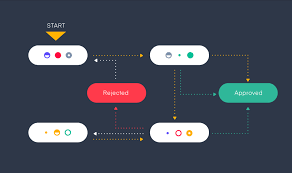
SuiteFlow is NetSuite’s built-in workflow management tool that lets you create visual workflows tied to specific record types. You can trigger actions based on user behavior, record updates, or scheduled timing – all through a user-friendly interface.
Unlike SuiteScript (which requires JavaScript), SuiteFlow is low-code, making it accessible for functional administrators who may not have development backgrounds but understand business logic. You can learn more about SuiteFlow development here!
Why Use SuiteFlow?
SuiteFlow helps companies:
- Automate approvals (sales orders, purchase orders, expense reports)
- Route tasks or alerts to the right employees
- Enforce business rules without relying on manual checks
- Maintain data consistency through conditional logic and field updates
- Improve visibility into multi-step processes like hiring, onboarding, or customer service
Ultimately, it helps businesses reduce errors, save time, and ensure operational consistency.
Core Components of a SuiteFlow Workflow
To understand how SuiteFlow works, it’s important to break down the building blocks of a workflow:
1. Record Type
Every workflow is tied to a record type (e.g., Sales Order, Customer, Vendor Bill). This defines what kind of records the workflow monitors.
2. Trigger Events
You specify when the workflow should start—on create, edit, view, delete, or on a scheduled basis.
3. States
Workflows are structured as states, which represent different stages of the process. Each state can contain actions and transitions.
4. Actions
These are the tasks that happen within a state. Examples include:
- Sending emails
- Setting field values
- Creating related records
- Initiating approvals
5. Transitions
These define how and when the workflow moves from one state to another, typically based on conditions.
Building a Workflow: Step-by-Step Example
Let’s walk through a simple example: Automating sales order approval for transactions over $10,000.
Step 1: Create the Workflow
- Go to Customization > Workflow > Workflows > New
- Set the record type to Sales Order
- Name it “Sales Order Approval Workflow”
- Set the trigger to “On Create” and “On Update”
Step 2: Define States
- Start: The default starting point
- Pending Approval: A state where the order is waiting for manager review
- Approved: The order is approved
- Rejected: The order is denied
Step 3: Add Actions
In the “Pending Approval” state, add actions like:
- Send email to Sales Manager
- Create a task record for the approver
- Lock record editing if necessary
In the “Approved” state, you might:
- Set a field (e.g., custom “Approval Status”) to “Approved”
- Unlock record for processing
- Send notification to fulfillment
In the “Rejected” state:
- Set field to “Rejected”
- Send reason to the sales rep
Step 4: Define Transitions
Create a condition such as:
- If Amount > $10,000, transition to “Pending Approval”
- If approved, go to “Approved”
- If not approved, go to “Rejected”
This entire workflow can be built without a single line of code—and modified over time as your business evolves.
Common Use Cases for SuiteFlow
SuiteFlow is incredibly versatile. Here are some real-world use cases across different departments:
Sales & Finance
- Auto-approve low-value sales orders
- Route large transactions to finance for approval
- Send notifications for overdue invoices
Procurement
- Multi-level purchase order approvals based on amount and department
- Alert users when vendor contracts are about to expire
- Automatically assign buyers to POs based on location
HR & Employee Management
- Automate onboarding checklists
- Route leave requests to appropriate managers
- Trigger training assignments after hire
Customer Service
- Automatically escalate support tickets based on SLA
- Notify customers when cases are updated
- Track satisfaction surveys post-resolution
SuiteFlow vs. SuiteScript vs. SuiteBuilder
| Feature | SuiteFlow | SuiteScript | SuiteBuilder |
| Complexity | Low-code / Visual | Full-code (JavaScript) | No-code |
| Use Case | Approvals, notifications, field logic | Custom logic, integrations, automation | Fields, records, forms |
| Best For | Admins & Business Analysts | Developers | Admins |
SuiteFlow fills a middle ground—powerful enough to build dynamic processes, yet accessible enough for non-developers.
Best Practices for Working with SuiteFlow
To get the most from SuiteFlow, follow these tips:
1. Start Simple
Begin with basic workflows (like email alerts or approvals) before tackling multi-state logic.
2. Name Everything Clearly
Use descriptive names for states, transitions, and conditions to make workflows easy to maintain.
3. Use Logging for Debugging
Enable logging on workflows to troubleshoot unexpected behavior.
4. Use Conditions Strategically
Don’t overload every state with conditions—use them where logic actually branches.
5. Clone and Test
Before making major changes to a workflow in production, clone it and test in a sandbox.
6. Document Workflow Behavior
Maintain internal documentation that outlines what the workflow does, especially if multiple admins work in NetSuite.
SuiteFlow Limitations
While SuiteFlow is powerful, it’s not ideal for:
- Complex logic involving external APIs
- High-performance batch processing
- Custom interfaces or deeply nested record manipulation
In these cases, SuiteScript or integrations via RESTlet/Web Services are better suited.
SuiteFlow and NetSuite Updates
NetSuite rolls out two major updates annually. SuiteFlow is tightly integrated into the core platform and is maintained and updated accordingly. However, it’s still wise to:
- Test workflows in a sandbox before each update
- Use script logs and NetSuite’s Workflow History panel for auditing
- Regularly review workflows for outdated logic or unused actions
Final Thoughts
SuiteFlow empowers NetSuite users to design, implement, and manage business workflows through an intuitive, visual interface. Whether you’re a financial controller, operations manager, or NetSuite administrator, SuiteFlow gives you the tools to automate repetitive tasks, enforce business policies, and streamline approvals—without needing a background in coding.
With careful planning and proper use of its features, SuiteFlow can significantly improve operational efficiency, reduce errors, and increase visibility across departments. As businesses scale and processes grow in complexity, SuiteFlow ensures your NetSuite instance remains agile, organized, and future-ready.