Video content has become the dominant force in digital communication. Whether you’re a marketer trying to reach new audiences, a creator building a brand, or a business explaining a product, video consistently outperforms every other format. The problem has always been production — shooting, editing, and rendering professional video takes time, equipment, and skill that most people simply don’t have.
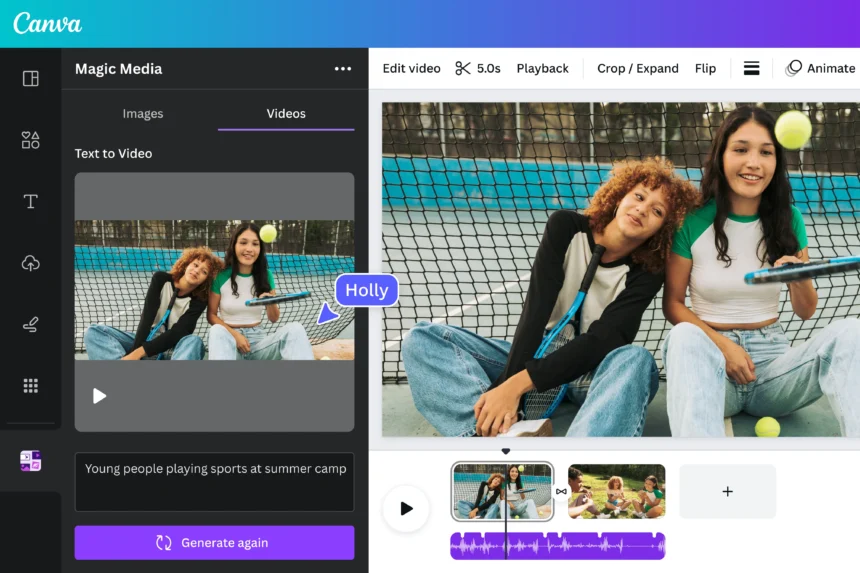
That’s where an AI text to video generator is changing the game. These tools let you describe a scene in plain language and watch it come to life as a fully rendered video clip. No camera. No editing software. No production crew. Just a text prompt and a few seconds of processing time.
The technology has matured rapidly. Early AI video tools produced shaky, unrealistic results. Today’s generators deliver smooth motion, accurate physics, and cinematic quality that would have seemed impossible just two years ago. This guide breaks down how these tools work, what to look for when choosing one, and how to get the best results from your prompts.
What Is an AI Text to Video Generator?
An AI text to video generator is a machine learning system trained to translate written descriptions into video sequences. You type a prompt — something like “a golden retriever running through a sunlit meadow” — and the model generates a short video clip that matches your description.
These systems are built on large generative models, similar in concept to the language models behind AI chatbots, but trained on vast libraries of video data. The model learns the relationship between words and visual motion, allowing it to synthesize new footage that has never been filmed.
The output isn’t assembled from stock clips or pre-recorded footage. Every frame is generated from scratch based on your input. This means you can create scenes that would be impossible or prohibitively expensive to film — abstract visuals, fantastical environments, or highly specific scenarios that no stock library would carry. Most modern AI video generators also support image-to-video workflows, where you provide a still image and the AI animates it, adding motion while preserving the visual style and composition of the original.
How the Technology Works
The core of most AI video generators is a diffusion model — the same architecture behind popular AI image generators, extended into the temporal dimension. Where an image model learns to generate a single frame, a video model learns to generate sequences of frames that flow coherently over time.
Training these models requires enormous datasets of video paired with text descriptions. The model learns which visual patterns correspond to which words, and more importantly, how objects move, interact, and change over time. This is what allows the AI to simulate realistic physics — water flowing, cloth rippling, people walking — without any explicit programming of those behaviors. More advanced systems encode video in three-dimensional latent space rather than treating it as a flat sequence of images, producing more coherent motion and better spatial consistency across frames.
Key Features to Look for in an AI Video Generator
Not all AI video tools are created equal. The gap between a basic generator and a professional-grade tool is significant, and choosing the wrong one can mean hours of frustration with unusable output. Here are the features that separate good tools from great ones.
Text Prompt Accuracy
The most important quality in any AI video generator is how faithfully it interprets your prompt. A strong model should capture not just the subject of your description but the mood, lighting, camera angle, and motion you specify. Test this by writing detailed prompts and checking whether the output reflects the nuances you described. Tools that only respond to broad strokes will limit your creative control significantly. The difference between a tool that understands “slow cinematic tracking shot at golden hour” and one that ignores those details is the difference between a usable clip and a generic one.
Video Quality and Resolution
Resolution matters, especially if you’re creating content for professional use. Look for tools that support at least 1080p output, with 4K options for high-end production work. Beyond raw resolution, pay attention to temporal consistency — whether objects and characters maintain their appearance across frames — and motion smoothness. Choppy or flickering video is a sign of a weaker model, regardless of the stated resolution. Physics accuracy is another marker of quality: realistic water, fabric, and human movement indicate a model trained on high-quality data.
Generation Speed and Workflow Integration
For creators working at volume, generation speed is a practical concern. Some tools take several minutes per clip; others deliver results in under a minute. Consider how the tool fits into your broader workflow — whether it integrates with editing software, supports batch generation, or offers an API for automation. A tool that produces excellent results but requires a 10-minute wait per clip may not be practical for high-output content pipelines. Balance quality against throughput based on your specific production needs.
How to Create Videos From Text Using AI
Getting good results from an AI video generator is as much about how you write your prompts as it is about which tool you use. A vague prompt produces a generic result. A specific, well-structured prompt gives the model the information it needs to generate something genuinely useful. Understanding the structure of an effective prompt is the single most valuable skill you can develop when working with these tools.
Writing Effective Text Prompts
Start with the subject and action: who or what is in the scene, and what are they doing? Then add context — the environment, time of day, weather, and any relevant background details. Finally, specify the visual style: cinematic, documentary, animated, photorealistic, or whatever fits your project.
For example, instead of “a person walking in a city,” try “a young woman in a red coat walking through a rain-soaked Tokyo street at night, neon reflections on the wet pavement, slow cinematic tracking shot.” The second prompt gives the model far more to work with and produces a far more specific result. Avoid contradictory instructions and keep your prompt focused on a single scene. AI video generators work best with clear, coherent descriptions rather than complex multi-scene narratives that require continuity across cuts.
Customizing Your AI-Generated Video
Most professional AI video tools offer controls beyond the text prompt. Motion brush features let you define which parts of the scene should move and in which direction — useful for animating a specific element while keeping the background static. Camera control settings let you specify movement like pan, zoom, or orbit, giving your video a more intentional, directed feel.
After generation, review the clip and iterate. If the motion isn’t quite right, adjust your prompt to be more specific about the movement you want. If the style is off, add style descriptors or reference a visual aesthetic explicitly. Most tools allow you to regenerate with slight variations, so treat the first output as a draft rather than a final product. Iteration is part of the process, and each round of refinement brings you closer to the result you’re after.
Use Cases for AI Text to Video Generation
The practical applications for AI video generation span nearly every industry. Understanding where these tools add the most value helps you decide how to integrate them into your own work. From solo creators to enterprise marketing teams, the use cases are broad and growing as the technology improves.
Marketing and Social Media Content
For marketers, AI video generation removes one of the biggest barriers to consistent content production: cost. Creating a library of short-form videos for social media — product showcases, brand stories, promotional clips — traditionally required a production budget and a team. With AI video creation tools, a single person can produce multiple polished clips in a day.
The key is matching the visual style to your brand. Use consistent prompt language across your content to maintain a coherent aesthetic, and treat AI-generated clips as a starting point that you can refine or combine with other footage in post-production. Platforms like Instagram Reels, TikTok, and YouTube Shorts reward consistent, high-quality video output — and AI generation makes that volume achievable without a dedicated production team.
Educational and Training Videos
Educators and corporate trainers are finding AI video generation particularly valuable for illustrating abstract concepts. Explaining a biological process, a historical event, or a technical workflow is far more effective with visual support, but producing custom animations has historically been expensive and time-consuming.
AI video tools make it practical to create custom visual content for specific lessons or training modules without a dedicated animation team. The result is more engaging material that can be updated quickly as content evolves — a significant advantage over static slides or generic stock footage. For organizations that need to produce training content at scale, the efficiency gains are substantial.
Film and Creative Production
Independent filmmakers and creative directors are using AI video generation for pre-visualization — creating rough visual representations of scenes before committing to a full shoot. This allows directors to test compositions, lighting concepts, and camera movements without the cost of a production day.
Beyond pre-vis, some creators are incorporating AI-generated footage directly into finished work, blending it with live-action material to create visual effects that would otherwise require a dedicated VFX budget. Tools like Kling AI, with their physics-accurate motion and high-resolution output, are making this kind of hybrid production accessible to independent creators who previously couldn’t afford it.
Making AI Video Work for You
The shift toward AI-generated video is not a distant trend — it’s happening now, and the tools available today are already capable of producing content that meets professional standards. Whether you’re a solo creator, a marketing team, or an enterprise looking to scale content production, AI text to video generators offer a practical path to higher output without proportional increases in cost or effort.
The most important step is simply to start. Pick a tool, write a prompt, and see what it produces. The learning curve is shorter than you might expect, and the gap between your first attempt and a polished result narrows quickly with practice. Focus on prompt quality, iterate on your outputs, and use the customization features available to you.
As the technology continues to improve, the creators who invest time in learning these tools now will have a significant advantage. The barrier to professional video production has never been lower — and it’s only going to drop further from here.