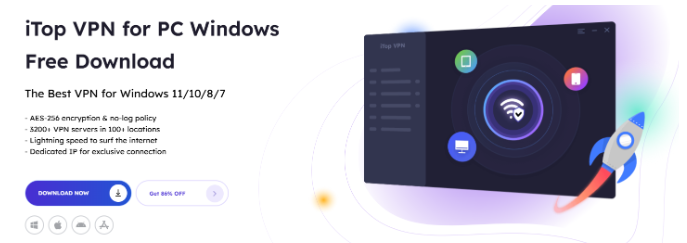
In today’s digital landscape, online privacy invasion has reached alarming levels. From ISPs selling your browsing data to hackers exploiting unsecured connections, your personal information is constantly at risk. iTop VPN provides a practical solution to encrypt your internet traffic and safeguard your digital identity.
Your online behavior is monitored. Each download, search, and click is transferred through your Internet Service Provider (ISP), and it becomes accessible to be noted, studied, and sold to third-party businesses. The current cybersecurity statistics indicate that, on average, each organization experiences 1,876 cyberattacks per week, representing a 75% increase from 2024.
However, you can defend yourself. Encrypting your internet traffic builds an impenetrable wall around all the digital processes, and iTop VPN can provide one of the most user-friendly tools on the market.
Why Do We Need Encryption Today?
Is your ISP tracking what you search and stream online? Unless you encrypt the connection, your ISP will be able to see everything you do online. According to recent statistics, 92% of the American population is concerned about their online privacy, but only 14% take appropriate measures to encrypt their messages.
Millions risk being exposed to the risk of:
- Government surveillance with a legal request of data – By requesting data about you, the government can see what websites you go to and what you do online
- Attacks by cybercriminals on open networks – There is theft of sensitive data by hackers on open networks
- Identity theft from accessible personal information – Your private data becomes vulnerable to malicious actors
- ISP data harvesting for advertising revenue – Internet providers collect and sell your browsing patterns to third parties
An average business suffers a data breach that costs the company an average of $4.88 million per incident, the highest in its history. The same risk happens to personal users whose unencrypted traffic is compromised.
What is DNS Leak? A DNS leak occurs when your machine stops using the VPN tunnel and instead directs domain name requests to your ISP, revealing the sites you are visiting even with a VPN.
Impressive Features of iTop VPN
iTop VPN employs military-grade encryption protocols to safeguard your online communications. The service uses AES-256 encryption to create secure tunnels for your data. Security tests confirm that the company successfully prevents IP and DNS leaks.
There are several security levels used in the service:
- AES-256 encryption standards for data protection
- Kill switch technology to prevent exposure during disconnections
- DNS leak protection for domain name requests
iTop VPN Setup Guide
Step 1: Select Your iTop VPN Package
Begin by choosing between iTop VPN’s free and paid versions. The free version offers low-usage browsing with basic encryption and a daily data allowance. Premium accounts offer unlimited bandwidth, increased speed, and enhanced protection.
Step 2: Install and Download the Application
Visit the official page of iTop VPN
- Download the correct app for your device (Windows, Mac, iOS, Android)
- Download the program through the installer
- Open the app, and then you can use it.
Step 3: Security Setting Configuration
Visit the configuration menu to optimize your security settings:
- Turn on the kill switch: disconnect the internet when the VPN does not work
- Allow DNS leak prevention: Forward domain queries via an encrypted tunnel
- Set up split tunneling: Select the applications that get VPN protection
- Choose the best protocol: According to your needs, choose to strike a balance between speed and security
These are the three most common settings you need to turn on instantly:
- Kill Switch – Blocks the leak of data in case of disconnection
- DNS Leak Protection – Keeps your browsing private
- Auto-Connect – Automatically secures new network connections
Step 4: Connect to Secure Servers
iTop VPN has specialized servers for various uses:
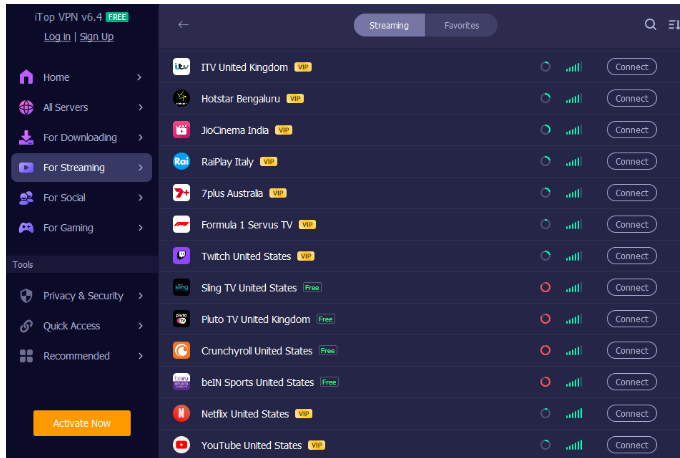
- Streaming servers: Bypass geographic content restrictions
- Gaming servers: Reduce latency for online gaming
- Social servers: General browsing and privacy protection
Step 5: Verify Your Encryption Status
Test your connection security using these methods:
- Compare your IP address before and after connecting
- Run DNS leak tests to verify traffic routing
- Test the kill switch by manually disconnecting the VPN
- Monitor your connection speed for performance optimization
Advanced Security Features
Ad and Tracker Blocking
High-end iTop VPN plans include built-in ad blocker and tracker protection. Enable these features to:
- Block malicious advertisements
- Prevent tracking cookies
- Stop browser fingerprinting
- Reduce data usage and improve loading speeds
Multi-Device Protection
iTop VPN has provided users with more than 3200 reliable and high-quality servers in 100+ locations distributed around the world. Protect all your devices with a single account. iTop VPN supports simultaneous connections on Windows, Mac, iOS, and Android. All devices receive the same level of encryption protection without affecting device performance.
Tips for Stronger Online Privacy
In addition to VPN encryption, secure practices are:
- Wherever possible, use HTTPS websites on your side so that there is a two-way encryption
- Two-factor authentication of critical accounts
- Ensure the software is updated to seal security flaws
- Do not make any sensitive communications on an insecure Wi-Fi, even under a VPN
- Online accounts must be secured using distinct, powerful passwords.
Diagnostics of Common Problems
App Compatibility Issues
Some applications may conflict with VPN connections.
Solution: Use split tunneling to exclude certain apps while protecting sensitive activities.
Connection Drops
Network instability may cause VPN disconnections.
Solution: Activate the kill switch option in iTop to shut down all internet traffic in the event of encryption failure.
Best Practices for Maximum Protection
Your traffic being encrypted is only one step. These are other security measures that ought to be considered:
The encryptions should always be multi-layered; this is done by always using a site that uses HTTPS, if available
- Set up Two-factor identification in prudent accounts
- Use frequent software updates to secure against security holes
- Avoid sensitive actions without a VPN on public networks
- Make up unique, powerful passwords for any account online
Conclusion
iTop VPN is ideal for customers seeking basic protection against encryption at an affordable price. The service is reliable enough to hide your IP address and code traffic, which is appropriate for both privacy and accessing content. Take control of your online experience. Download iTop VPN now for essential security and seamless access at a price everyone can afford.