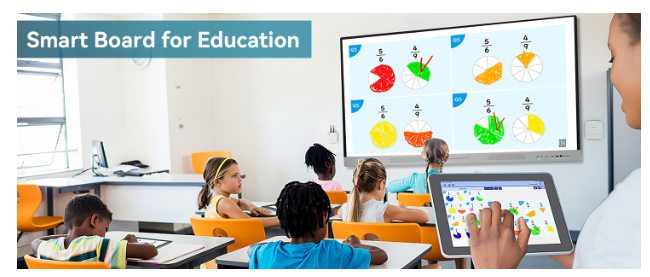
What’s the one device schools urgently need today? Ask any teacher about classroom clutter, and you’ll hear a list of gadgets—projectors, laptops, speakers, and moreeach solving only a small part of the teaching puzzle.
None, however, provide a unified solution for interactive, student-centered learning.
That’s where interactive whiteboards come in, offering an all-in-one platform that combines essential functions, making them the go-to device for modern classrooms.
Why Existing Setups Fall Short in Today’s Classroom
- Projector fatigue – Bulbs burn out, images wash out under ambient light, and calibration drifts over time.
- Cable chaos – HDMI, VGA, USB‑C; teachers waste precious minutes troubleshooting connections.
- Static content – Traditional displays can show slides, but students can’t touch or manipulate what they see.
- Fragmented software – Assessment apps live on student tablets, while lesson resources hide on cloud drives, forcing educators to juggle logins and screens.
These friction points drain instructional time and frustrate both teachers and learners. When engagement dips, academic outcomes follow suit.
HKMLC Interactive Whiteboards solve these issues by combining various functions into one device, eliminating the need for separate projectors, cables, and software fragmentation.
Interactive Displays Defined
An interactive display often called a “digital whiteboard” or “smart panel”—is a flat‑panel touchscreen (typically 65″–86″) that functions as:
- Ultra‑bright 4K monitor visible from any seat
- 20‑point multi‑touch surface allowing multiple students to write simultaneously
- Onboard computer running a customized Android or Windows environment
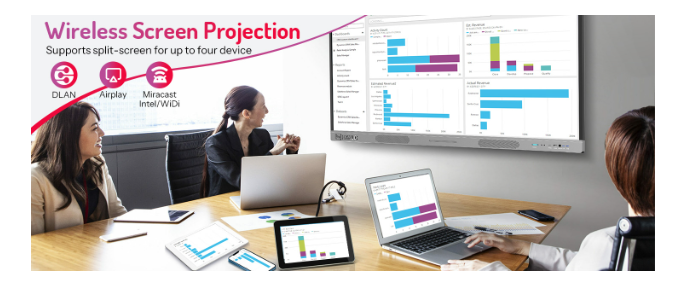
- Wireless casting hub for BYOD (bring your own device) mirroring
- Annotation layer that floats above any input source, letting teachers mark up webpages, PDFs, or live camera feeds
Crucially, today’s top models integrate classroom‑ready software: math manipulatives, language‑learning widgets, formative quiz systems, and cloud storage for digital lesson boards.
Seven Pain Points Solved Overnight
Instant Engagement
Touch, drag, and drop activities turn passive slide decks into interactive experiences. Research shows that tactile interaction boosts retention by up to 25 % compared with lecture‑only delivery.
Equity for Hybrid Learners
Built‑in screen‑sharing means remote students see the same dynamic annotations as in‑room peers. Some panels embed microphones and 4K cameras to capture the entire lesson in a single feed.
Simplified Classroom Hardware
One cable powers the screen; one stylus replaces markers, erasers, and document cameras. Teachers tap an icon rather than hunting for a spare HDMI adapter.
Real‑Time Assessment
Pop‑quiz widgets push questions to student devices; results display in colorful bar charts within seconds, guiding immediate reteaching.
Accessibility Built In
Font magnification, color‑contrast adjustments, and text‑to‑speech features support diverse learning needs without third‑party add‑ons.
Durability and Low Maintenance
LED panels last 50,000+ hours roughly 15 years of school days without bulb changes. Anti‑glare glass resists fingerprints and scratch damage.
Expansion via App Ecosystems
App stores host coding environments, virtual science labs, and literacy games. Schools update features over the air instead of replacing hardware every few years.
Pedagogical Wins Across Grade Levels
Kindergarten – Phonemic Fun
Students drag letter tiles to spell CVC words; the board’s text‑to‑speech plays each phoneme, reinforcing sound‑symbol correspondence.
Middle School – Math Mastery
Graphing tools let learners draw quadratic functions with their fingertips, instantly seeing axis intersections and line symmetry.
High School – Socratic Seminars
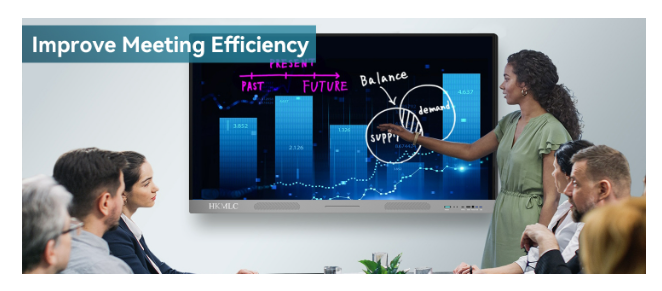
Split‑screen mode shows live student polls on one side and primary‑source documents on the other, enabling data‑driven debate.
Career & Technical Education
AutoCAD renderings cast wirelessly; learners annotate dimensions together, then export changes back to their laptops.
These examples align with Bloom’s Taxonomy, moving students from remembering facts to creating original work all on the same device.
Implementation Roadmap: From Pilot to District‑Wide Rollout
- Stakeholder Survey – Identify teacher pain points; align goals with district tech plan.
- Vendor Demos – Invite top three brands for hands‑on lessons; collect rubric scores on usability, latency, and software fit.
- Pilot Program – Install in two classrooms per grade band for one semester. Gather data: engagement metrics, IT tickets, and teacher feedback.
- Professional Development – Host workshops on lesson redesign, not just hardware operation. Provide follow‑up coaching sessions.
- Phased Deployment – Roll out 10 % of classrooms per term, prioritizing grade levels with standardized‑test pressure.
- Evaluate & Iterate – Review KPIs; adjust training and app selections.
- Full Integration – Link boards to LMS for automatic roster sync and cloud backup.
Choosing a vendor with bundled PD hours and phone‑support SLAs avoids post‑installation abandonment of the common graveyard of ed‑tech initiatives.
Final Thoughts :
When schools ask, “What’s a device we desperately need?” the answer in 2025 is clear: an interactive display that unifies projection, collaboration, and assessment into a single, intuitive tool.
By replacing outdated projectors and cobbled‑together peripherals, these boards reclaim instructional minutes, ignite student engagement, and deliver measurable ROI.
Districts seeking a proven end‑to‑end ecosystem often turn to HKMLC smart Whiteboards for their all‑in‑one hardware‑software bundles, robust warranty, and literacy‑aligned activity libraries (first mention).