We’ve all been there: you sit down at your computer, ready to get things done, only to be met with a wall of clutter. Reports, screenshots, vacation photos, downloaded invoices, and half a dozen shortcuts all crowd your desktop, turning what should be your productivity hub into a source of stress. Looking for a single file feels less like work and more like a frustrating round of “Where’s Waldo?” If this sounds familiar, you’re not alone. The good news is, bringing order to your desktop doesn’t have to be complicated.
That’s where iTop Easy Desktop comes in—a smart, lightweight tool built to transform digital chaos into a clean, organized workspace.
Unlike manual cleanups that only last until the next download, iTop Easy Desktop automates the process. It keeps your files neatly arranged, your tools within reach, and your desktop looking the way you want it—without constant effort.
The Hidden Cost of Desktop Clutter
A messy desktop is more than an eyesore; it comes at a real cost. Every extra minute you spend hunting for a file is time lost. The endless rows of icons also create constant visual noise, making it harder to focus on the work that matters. On top of that, loading dozens of items at startup can even slow your system down.
The cycle is all too familiar: you save something to the desktop “just for now,” plan to organize it later, and before you realize it, your screen is buried under digital piles. Manual cleanups are tedious, and that’s why most of us put them off.
This is exactly why an automated, “set-it-and-forget-it” solution like iTop Easy Desktop isn’t just nice to have—it’s essential if you want to save time, stay focused, and bring some calm back to your daily workflow.
What is iTop Easy Desktop?
At its core, iTop Easy Desktop is a simple but powerful organization tool for Windows. It organizes your files, folders, and shortcuts into neat, color-coded groups so your desktop finally feels easy on the eyes and effortless to navigate. But it’s not just about appearances. With smart file management, handy widgets, customizable themes, and even an AI assistant built in, iTop Easy Desktop turns a messy screen into a space that actually supports the way you work and makes everyday tasks feel smoother.
Smart Features for Effortless Organization
So, how does iTop Easy Desktop achieve this transformation? Through a combination of powerful, user-friendly features.
- One-Click Smart Arrangement
The star of the show. With a single click, iTop Easy Desktop instantly arranges your desktop and groups every icon into neatly labeled boxes. It automatically distinguishes between file types—documents, images, applications, folders, and more. This feature alone saves you the tedious effort of hours of manual sorting, providing immediate relief from clutter. - Fully Customizable Layouts
Automation doesn’t mean losing control. After the initial smart arrangement, you have complete freedom. You can drag and drop the entire group boxes to any position on your desktop grid. Prefer your work documents on the left and creative projects on the right? No problem. You can customize the icon size and spacing within each group, ensuring the layout perfectly matches your visual preferences and workflow. - Integrated Productivity Dashboard (Widgets)
iTop Easy Desktop goes beyond simple file organization by embedding useful widgets directly onto your canvas. This turns your desktop from a static file cabinet into a dynamic dashboard. Key widgets include:
- Schedule: Sync with your Google Calendar and Outlook Calendar to keep track of meetings and deadlines without switching apps.
- iNotes: Digital sticky notes for quick ideas, reminders, or to-do lists.
- Weather & Clock: Stay informed with real-time weather updates and a clear time display.
- Quick Tools: A handy centralized spot for iTop Easy Desktop’s own features like folder protection and wallpaper settings.
- iPomodoro Timer: Boost your focus using the proven Pomodoro technique, built right into your desktop.
- Dynamic and Static Wallpapers
Your workspace should inspire you. The built-in wallpaper engine allows you to personalize your environment fully. Choose from a library of stunning live wallpapers to bring your screen to life, or opt for a clean, static image or solid color for a more minimalist vibe. - Auto-Hide for Ultimate Focus
For moments requiring deep concentration, the Auto-Hide feature is a game-changer. A simple double-click on the desktop instantly hides all icon groups and widgets, revealing a pristine, clutter-free screen. Hover your mouse to the edge of the screen to bring everything back. It’s the perfect way to minimize distractions without losing access to your files. - Protect Your Digital Life
You can easily protect your files and organize your workspace with just a few clicks. Use Private Box to keep your sensitive data, photos, and videos safe from prying eyes by password-protecting folders and preventing unauthorized access. And when you need to quickly clean up your desktop for a screen share or presentation, you can hide all your icons and files with just a double-click, giving you a clean and professional look.
Who should use iTop Easy Desktop?
The short answer is almost everyone who uses a computer.
- Students: Keep lecture notes, research papers, and assignment files neatly separated and easy to find.
- Professionals & Remote Workers: Manage countless project files, spreadsheets, and presentation decks without the chaos.
- Creatives: Organize vast libraries of images, design assets, and project folders visually.
- Gamers and Power Users: Maintain a sleek, performance-oriented desktop with quick access to games and utilities.
How to Use iTop Easy Desktop?
You don’t need to be a tech expert to get started. The process is straightforward:
- Download the installer from the official iTop website.
- Run the installation—it’s quick and hassle-free.
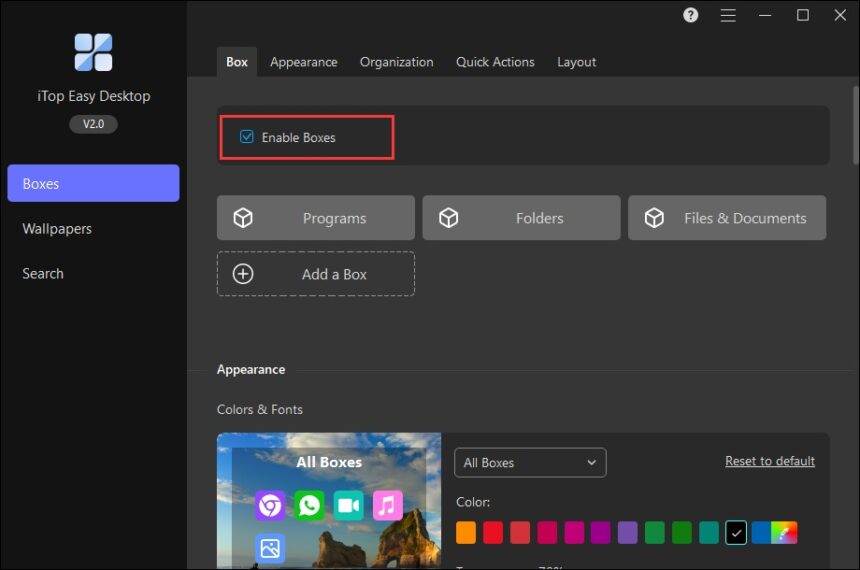
- Launch iTop Easy Desktop. You’ll immediately see the option to “Enable Boxes.” Click it.
- In less than a minute, witness the magic as your desktop is sorted into logical groups.
- From there, explore the settings to customize your layout, enable widgets, set up a new wallpaper, and activate features like Auto-Hide.
The application is designed to be lightweight, running quietly in the background without consuming significant system resources.
Conclusion
A messy desktop doesn’t just look bad—it slows you down and makes it harder to focus. iTop Easy Desktop takes that problem off your hands by automatically sorting and tidying everything for you. The result is a workspace that feels lighter, more organized, and easier to use. You can still make it your own with plenty of customization, but the heavy lifting happens in the background. Instead of wasting energy on cleaning up files, you can put your attention where it matters most. If you’re ready to ditch the clutter and work with a clear head, give iTop Easy Desktop a try—it might surprise you how much calmer and faster your computer feels.