Preface
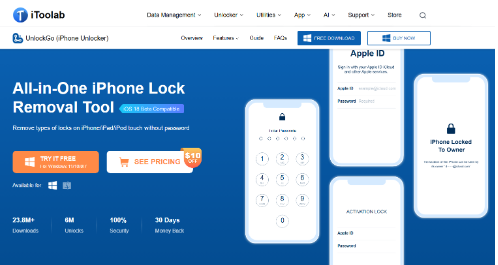
Scored an amazing deal on a gently used iPhone, but it’s stubbornly demanding a password you don’t have? Or were you just gifted an iPhone from a well-meaning friend or family member, but they forgot their password? We’ve all been there. Fortunately, this should not be a frustrating dead-end. iToolab UnlockGo can help unlock iPhone, even without a password. This guide will walk you through its functions and how it works to get you back in control. Let’s dive in.
What is iToolab UnlockGo, and What iPhone Locks Can It Bypass?
UnlockGo for iOS is a powerful all-in-one tool by iToolab that has the potential to unlock different types of iPhone locks within minutes. It is 100% secured and available for use on Mac 10.11 or newer and Windows 11, 10, 8, and 7. You can effortlessly use it to access a second-hand iPhone without its password by removing the following locks:
Removing all screen locks: iToolab UnlockGo can help you remove various iPhone screen locks when you don’t have a password for a used iPhone. These locks include a 4 to 6-digit passcode, a custom numeric or alphanumeric code, and a Face/Touch ID.
Deleting Apple ID: You can use UnlockGo to delete the Apple ID on a second-hand iPhone to take full control of your recently acquired device. This also lets you enjoy all iCloud features and services without any restrictions.
iPhone Locked to Owner: iToolab UnlockGo can help to bypass a used iPhone’s Activation Lock when the previous owner is far away. This lets you use all iPhone features as you would have on a brand-new device.
How to Unlock a Used iPhone Without a Password Using iToolab UnlockGo
iToolab UnlockGo is a user-friendly software solution that can help you unlock a used iPhone without any complicated steps. Here is the step-by-step guide for the process:
Step 1: Install iToolab UnlockGo on a PC
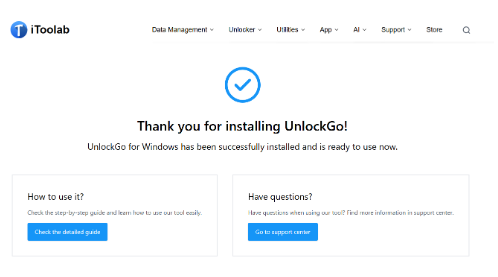
Open the official iToolab website and select UnlockGo for iOS. Download it on your desktop or laptop, and follow the installation prompts on the screen until it launches.
Step 2: Connect the iPhone and select the type of lock to remove
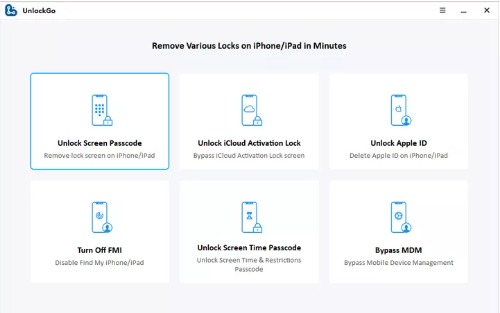
Connect the locked second-hand iPhone to the computer with a USB cable and select the type of iPhone lock you intend to bypass. For instance, click on the first option, “Unlock Screen Passcode”, if you want to remove the lock screen.
Step 3: Enter the iPhone into “Recovery Mode”
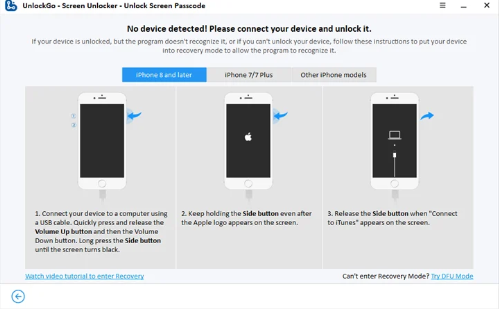
Click “Start” to proceed. You’ll see the “No device detected! Please connect your device and unlock it” page. Follow the provided instructions to put the locked iPhone into recovery mode so the UnlockGo program can recognize it.
Step 4: Download the latest firmware for the iPhone
Once in recovery mode, the used iPhone will restart. A new page will display on your computer screen, asking you to download the firmware that best matches the iPhone. You will see some basic information about the iPhone, including the firmware model and version. Add a save path and click “Download”.
Step 5: Start unlocking the used iPhone
After the necessary firmware is downloaded successfully, click “Unlock Now” to initiate the process immediately.
Step 6: Let the unlocking process complete
iToolab UnlockGo will start verifying and analyzing the downloaded firmware package. Use the progress bar to check the updating process. Do not disconnect the iPhone from the computer or close the UnlockGo lock removal tool until the process is complete.
Step 7: Finish the iPhone lock removal process
You’ll see a notification saying the unlock process is complete. The used iPhone should also restart, and if not, restart it manually and click “Done”. You should now be able to set up the iPhone with a new password, Face ID, or Touch ID.
How to Unlock a Used iPhone Locked to Owner with iToolab UnlockGo
If you get stuck on the ‘iPhone Locked to Owner’ screen when using a second-hand iPhone, use the following steps to bypass it:
Step 1: Select the lock type and connect iPhone
On the UnlockGo home screen, select “Unlock iCloud Activation Lock” and click “Start” on the next screen. Connect the locked iPhone to a computer using a lightning cable.
Step 2: Download the firmware package
You’ll see the download progress bar with the process shown in percentages. Wait a few minutes for it to finish.
Step 3: Enter DFU Mode
Click “Remove Now” after the firmware package finishes downloading. Your device will auto-enter recovery mode, and then you can manually put it into DFU mode using the instructions provided.
Step 4: Jailbreak the used iPhone
After the locked iPhone successfully enters DFU mode, UnlockGo will initiate the jailbreak process. Give it about 20 minutes, and do not disconnect the iPhone or use it during this time.
Step 5: Unlock the iPhone iCloud Activation lock
Once again, put the used iPhone into DFU mode for iToolab UnlockGo to commence the Activation Lock removal process, which takes about two minutes.
How to Bypass a Used iPhone’s Apple ID Without Password
Bypassing an Apple ID on a used iPhone is easy with iToolab UnlockGo. Here are the DIY steps to follow:
Step 1: Choose a lock type to remove
Launch iToolab UnlockGo on your computer and click “Unlock Apple ID”. Connect the used iPhone with a USB cable and click “Trust” on the phone screen.
Step 2: Start bypassing Apple ID
On the next screen, click “Unlock” to delete the Apple ID and iCloud account associated with the used iPhone. Remember that this feature is only available for iOS 11.4 or higher and applies to iPhones with a passcode lock and 2FA enabled.
Step 3: Confirm lock screen settings
UnlockGo will prompt you with questions and Yes/No answers to know whether the used iPhone had enabled the lock screen.
Step 4: Confirm Two-Factor Activation
On the next screen, you’ll have to answer whether the Two-Factor Authentication was activated on the used iPhone. You can manually check it by opening Settings > Apple ID > Password & Security.
Step 5: Download firmware
iToolab UnlockGo will automatically detect the used iPhone’s model. Click the dropdown arrow to choose a matching firmware version. Click “Download” and give it a few minutes to finish.
Step 6: Unlock the Apple ID
After the firmware download process, click “Unlock Now.” This will update the used iPhone’s iOS version to the latest version.
Step 7: Check the unlocking process progress
The Apple ID unlocking process will take almost 10 minutes. Be patient, and don’t disconnect the iPhone from your computer.
Step 8: Set up the used iPhone
The Apple ID associated with the secondhand iPhone will be erased. The iPhone will restart. Follow the provided guide to set it up. Click “Unlock with Password” on the iPhone screen and select “Use Device Passcode”. Enter the screen passcode and create a new Apple ID to enjoy all iPhone features without restrictions.
Summary
Generally, iToolab UnlockGo is very effective if you want to access a used iPhone without the password. It is easy to use and can help you unlock a secondhand iPhone even if the original owner isn’t cooperative. Try it today, and remove any iPhone lock restrictions safely and securely.