For content creators and developers, server performance isn’t just a technical specification—it’s the foundation of productivity. Whether rendering complex 3D animations, compiling large codebases, or managing massive media libraries, standard computer server hardware often hits frustrating bottlenecks. Processing speeds slow to a crawl, network transfers lag, and storage access becomes a waiting game. These limitations directly impact creative workflows and development cycles, turning what should be seamless operations into time-consuming obstacles.
Expansion cards offer a powerful solution to transcend these constraints. By adding specialized hardware components to existing server infrastructure, users can dramatically enhance processing power, network throughput, and storage performance without replacing entire systems. This upgrade path has become particularly relevant as more professionals embrace DIY NAS builds and customizable storage solutions tailored to their specific demands. Rather than settling for off-the-shelf limitations, creators and developers are taking control of their infrastructure. This article provides practical guidance on selecting and implementing expansion cards, building cost-effective DIY NAS systems, and integrating advanced customization tools to create server environments that truly support demanding creative and development work.
Understanding Expansion Cards in Computer Server Hardware
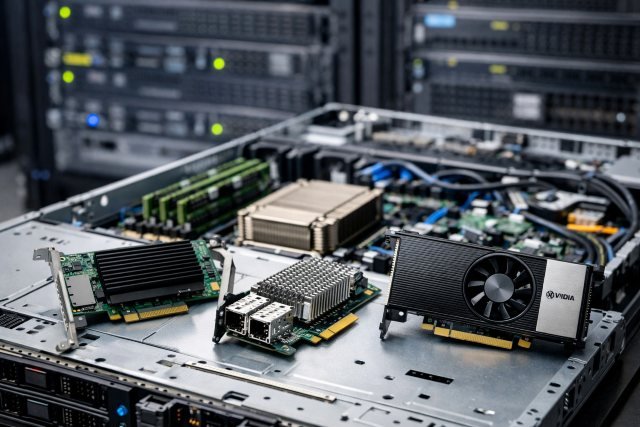
Expansion cards are specialized circuit boards that slot into a server’s motherboard, extending its capabilities beyond baseline configurations. Originating in the 1980s with the introduction of standardized bus architectures, these modular components revolutionized how users could upgrade systems without complete hardware replacement. In computer server hardware, expansion cards connect through PCIe slots, enabling administrators to add processing power, networking capacity, or storage interfaces on demand.
The fundamental advantage lies in scalability—servers can evolve alongside workload demands rather than becoming obsolete. A video editor processing 8K footage can install a dedicated GPU for hardware-accelerated rendering. A developer running virtual machines benefits from additional network interface cards that segment traffic efficiently. Storage-intensive workflows gain speed through NVMe adapter cards that bypass traditional SATA bottlenecks. This modularity proves essential for modern content creators who face constantly shifting technical requirements, from real-time collaboration demands to exponentially growing file sizes.
Today’s expansion ecosystem addresses specific pain points in creative and development environments. Rather than investing in entirely new infrastructure when a single component becomes limiting, professionals can strategically upgrade targeted subsystems. This approach reduces costs while maintaining performance standards necessary for competitive creative output and efficient code deployment workflows.
Key Expansion Cards for Enhanced Server Performance
Graphics Processing Units (GPUs) have become indispensable for content creators working with video editing, 3D rendering, and motion graphics. Modern editing software like DaVinci Resolve and Blender leverage GPU acceleration to process effects and renders that would otherwise take hours on CPU alone. A professional colorist working with RAW 6K footage can reduce export times from overnight renders to under an hour by adding a dedicated GPU card to their server hardware.
Network Interface Cards (NICs) address bandwidth limitations that plague collaborative workflows. When multiple team members access a central server simultaneously, standard gigabit connections create bottlenecks. Upgrading to 10GbE or 25GbE NICs enables real-time editing of files stored on network-attached storage, eliminating the need to copy massive project files locally. A development team running continuous integration pipelines benefits from reduced build times as code repositories transfer at higher speeds.
RAID controller cards provide both performance gains and data protection for storage-intensive operations. Hardware RAID offloads parity calculations from the CPU, maintaining system responsiveness during heavy disk activity. For photographers managing 50TB+ image libraries, a quality RAID controller ensures consistent read/write speeds while protecting against drive failures that could destroy years of work.
NVMe adapter cards transform older servers by adding ultra-fast SSD connectivity. These cards convert PCIe slots into M.2 NVMe interfaces, delivering sequential read speeds exceeding 7000MB/s—ten times faster than SATA SSDs. A game developer compiling large projects sees build times drop dramatically when source code resides on NVMe storage accessed through these adapters.
Types of Expansion Cards for Content Creators and Developers
Video production workflows benefit specifically from capture cards that ingest footage directly into editing systems, bypassing codec conversion delays. Audio engineers rely on DSP accelerator cards that handle plugin processing, freeing CPU resources for timeline playback. Developers working with machine learning models utilize specialized inference cards that accelerate neural network computations beyond what general-purpose GPUs provide. When selecting cards, verify compatibility with your server’s PCIe generation and available slot configurations—a PCIe 4.0 card in a 3.0 slot still functions but at reduced bandwidth. Check power requirements against your power supply capacity, as high-performance GPUs may demand dedicated 8-pin connectors that older server PSUs lack.
How to Select and Install Expansion Cards
Begin by auditing your current bottlenecks through monitoring tools that reveal whether CPU, storage, or network limits your workflows. Match card specifications to these constraints rather than pursuing maximum specs—a 100GbE NIC provides no benefit if your switch supports only 10GbE. Budget allocation should prioritize the component causing the most significant delays. Installation requires powering down completely, grounding yourself to prevent static discharge, and firmly seating cards until retention clips engage. Update firmware and drivers before running benchmarks to confirm expected performance gains. For RAID controllers, configure arrays through the card’s BIOS interface during startup, setting stripe sizes appropriate to your typical file operations—larger stripes for video files, smaller for database workloads.
Building a DIY NAS for Custom Storage Solutions
A DIY NAS (Network-Attached Storage) system represents a paradigm shift from proprietary appliances, offering content creators complete control over storage architecture at a fraction of commercial costs. Unlike consumer NAS boxes with locked specifications, a self-built system scales infinitely—start with four drives today, expand to twelve next year without vendor constraints. For photographers accumulating terabytes of RAW files or video editors managing multi-camera 4K projects, this flexibility proves essential as storage demands grow unpredictably.
The cost advantage becomes substantial at higher capacities. A commercial 48TB NAS unit might cost $3,000, while assembling equivalent DIY hardware—motherboard, CPU, RAM, drives, and case—typically runs $1,200 to $1,800. This budget efficiency extends beyond initial purchase; upgrading a single component doesn’t require replacing the entire system. A developer hosting Git repositories and continuous integration environments benefits from choosing server-grade components that prioritize uptime over the consumer parts found in off-the-shelf devices.
Customization extends to software ecosystems as well. Open-source platforms like TrueNAS or Unraid provide enterprise features—snapshots, replication, virtualization—without licensing fees. A motion graphics artist can configure ZFS file system with settings optimized for large sequential writes, while a web developer tunes the same system for thousands of small file operations. This adaptability makes DIY NAS particularly valuable for creative professionals whose workflows evolve as project types diversify, ensuring storage infrastructure adapts rather than dictates working methods.
Essential Hardware and Software for a DIY NAS
Core components begin with a motherboard offering sufficient SATA ports and PCIe slots for future expansion—typically six to eight drive connections minimum, with room for additional RAID controllers. Modern Intel or AMD CPUs with integrated graphics eliminate GPU costs while providing adequate processing for file serving and media transcoding. ECC RAM prevents data corruption during long-running operations, critical when managing irreplaceable creative assets. Drive selection balances capacity against reliability; NAS-rated drives withstand 24/7 operation better than desktop models. Software choices include TrueNAS for ZFS’s data integrity features, Unraid for mixed drive sizes, or OpenMediaVault for lightweight Debian-based management. Customization tools within these platforms allow fine-tuning network protocols, setting up automated backups, and configuring user permissions that match collaborative team structures.
Step-by-Step Guide to Assembling Your DIY NAS
Start by defining capacity requirements and redundancy levels—RAID 5 tolerates one drive failure, RAID 6 survives two. Install the CPU, RAM, and motherboard into a case with adequate cooling and drive bays. Connect SATA cables from motherboard to drives, ensuring secure connections that won’t vibrate loose. Install your chosen NAS operating system to a dedicated USB drive or small SSD, keeping data drives separate from the OS. Boot into the system and configure your storage pool, selecting file system type and redundancy scheme. Set static IP addresses to ensure consistent network access, then create shared folders with appropriate permissions for team members. Test transfer speeds using large files representative of actual workflows—video editors should verify sustained writes exceed 200MB/s for smooth timeline playback. Integrate expansion cards like 10GbE NICs at this stage, updating network switch configurations to utilize higher bandwidth. Schedule automated scrubs to verify data integrity monthly, and configure off-site backup replication to protect against catastrophic hardware failure.
Integrating Advanced Customization Tools and Compact Server Solutions
Modern compact server hardware has evolved to combine NAS functionality with PCIe expansion capabilities in form factors smaller than traditional tower servers, making them ideal for home studios with limited space. These modular systems allow creators and developers to deploy both project storage and GPU acceleration platforms in a single unit, consolidating what previously required separate machines. A videographer working from a dedicated editing suite can benefit from such consolidated infrastructure without sacrificing performance or expandability.
Advanced customization tools integrated into modern NAS ecosystems simplify configuration tasks that traditionally demanded command-line expertise. Web-based interfaces allow real-time monitoring of drive health, network throughput, and thermal performance through intuitive dashboards. Docker container support enables developers to deploy applications—Plex media servers, GitLab instances, or rendering farms—without manual dependency management. For a 3D artist running Blender render nodes, containerized workflows mean spinning up additional compute capacity takes minutes rather than hours of system administration.
The practical advantage emerges in hybrid setups where compact modular devices complement existing infrastructure. A development team might use a traditional rack server for production workloads while deploying smaller units as distributed testing environments across remote team members. Photographers benefit from portable configurations that serve as on-location backup systems during shoots, then integrate seamlessly with studio NAS arrays upon return. This flexibility addresses the modern creator’s need for infrastructure that adapts to varying work contexts—studio, remote, collaborative—without sacrificing performance or requiring duplicate investments in separate systems for each scenario.
Practical Implementation: Combining Expansion Cards and DIY NAS
Integrating expansion cards into a DIY NAS build requires strategic planning to maximize both components’ strengths. Begin by identifying your primary bottleneck—if network transfers limit collaborative editing, prioritize a 10GbE NIC before adding GPU acceleration. Install the NAS operating system first, verify basic functionality, then power down to add expansion cards. Common challenges include PCIe lane allocation conflicts where multiple high-bandwidth cards compete for motherboard resources; consult your motherboard manual to distribute cards across different CPU-connected slots rather than chipset lanes. BIOS settings may require enabling “Above 4G Decoding” for multiple GPUs or adjusting PCIe bifurcation for NVMe adapter cards. After installation, stress-test the system by simultaneously running large file transfers while the GPU processes renders—this reveals thermal issues or power supply inadequacies before production use. For developers running containerized services, allocate GPU passthrough to specific virtual machines through your NAS platform’s virtualization settings, ensuring render nodes access hardware acceleration without affecting file serving performance.
Maximizing Server Infrastructure for Creative and Development Workflows
Expansion cards provide a targeted, cost-effective pathway to overcome performance barriers in computer server hardware without complete system replacements. By strategically adding GPUs for rendering acceleration, high-speed NICs for collaborative workflows, or NVMe adapters for storage bottlenecks, content creators and developers gain immediate productivity improvements tailored to their specific demands. Building a DIY NAS further amplifies these advantages, delivering customizable storage solutions that scale alongside growing project libraries while maintaining budget control. The modular nature of this approach—selecting components based on actual workflow constraints rather than vendor-defined packages—empowers professionals to construct infrastructure that genuinely supports their creative and technical processes.
As server hardware continues evolving toward greater modularity and specialization, the principles outlined here remain constant: identify bottlenecks through monitoring, upgrade strategically rather than comprehensively, and prioritize flexibility for future adaptation. Whether exploring compact modular platforms or assembling traditional tower-based NAS systems, the combination of expansion cards and DIY storage creates resilient, high-performance environments. For creators facing exponentially growing file sizes and developers managing increasingly complex deployment pipelines, taking control of server infrastructure through these methods transforms hardware from a limiting factor into a competitive advantage that accelerates both creative output and development velocity.